Professional touch panel controller

One panel to control
your whole room.

The noxIT TouchGW 101 turns a rugged touch screen into a fully configurable control surface. One tap runs a whole sequence — up to 16 actions, in your own order and timing, across AV, audio, lighting and automation.

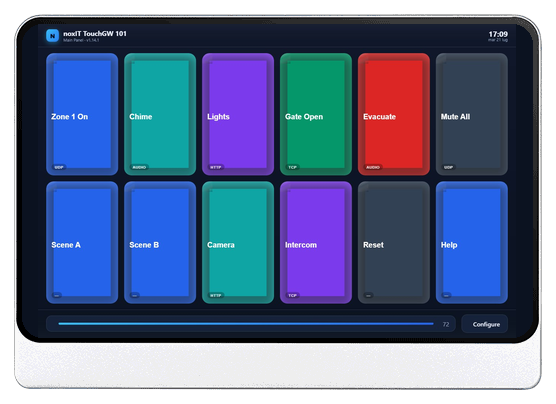
noxIT TouchGW 101 touch panel running the control app
16 actions per press Rockchip RK3568 quad-core Gigabit LAN Analog audio out Power-safe A/B updates HTTPS remote admin Worldwide time
Why TouchGW 101

Designed for real installations

Everything an integrator needs to deploy, secure and maintain a fleet of panels — built in, not bolted on.

Fully configurable

Design any layout of buttons on a grid, then chain up to 16 actions behind each one — UDP, TCP, HTTP and audio, in your own order and timing. Set it all up on the panel or from your browser.

Built for deployment

Power-safe A/B firmware updates with automatic rollback, hosted OTA, remote support and central syslog — roll out and maintain panels anywhere in the world.

Secure by default

HTTPS remote administration, an optional panel PIN, backlight-off screen sleep and cryptographically signed firmware — the panel stays locked down in the field.

Features

What the panel can do

A single static application boots straight into your control surface — no desktop, no clutter.

🎛️

Configurable buttons & layout

Any grid of buttons, each with its own icon, colour, shape and size.

🔊

Local audio playback

Play chimes, announcements or alarms from files stored on the device, with optional looping.

🌐

Multi-step network actions

One press runs up to 16 steps in order — UDP, TCP or HTTP (text or hex, with your own headers and body), each step reaching as many as 16 devices at once.

🕑

Worldwide time

Runs on UTC, syncs over NTP and auto-detects the display timezone anywhere it is installed.

🔒

Panel PIN & screen sleep

Optional numeric PIN plus backlight-off sleep to save power and lock the surface.

🖥️

Remote configuration

Manage the panel from any browser over HTTPS, with the same password-protected screen.

⬆️

Power-safe OTA updates

Signed A/B firmware updates stage to a spare slot and roll back automatically if they fail.

🛟

Remote support

One switch lets noxIT connect securely to troubleshoot — even behind a router.

📈

Syslog & health

Forward logs to a central syslog server with a once-a-minute device health report.

One press

A button is a sequence, not a command

Most touch panels send one command per button. This one runs the whole scene — in your order, at your timing, across every device involved.

Example — one button labelled “Open store”
  1. 1HTTP POST wakes the display controller
  2. wait 5 seconds while the screens come up
  3. 2one UDP command sets source and level on all four zone amplifiers at once
  4. 3the panel plays the opening chime from its own storage
  5. 4HTTP PUT recalls the trading-hours scene on the lighting gateway
16actions per press, run in order
16devices per action, addressed in parallel
10 ms – 2 minwait you can set before any step
  • UDP / TCP — text or hex payloads
  • HTTP — GET, POST or PUT with your own headers and body
  • Audio — play a local file, with optional looping
Try it

Use the panel, right here

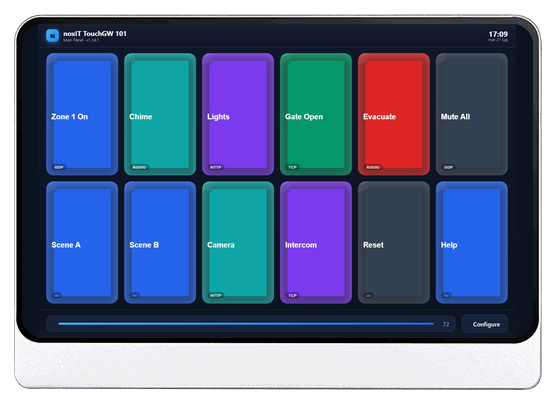
This is the actual TouchGW 101 interface running live in your browser. Tap the buttons, set the volume, then open Configure to explore every section — Buttons & Layout, Network, System & Logs, Security, Firmware and Advanced.

Tap a button — the badge shows its action type Drag the volume slider Configure — any password opens the settings in the demo

Everything here is simulated in your browser — no device is contacted and nothing you change is saved.

Front — running the noxIT control panelFront — running the control panel
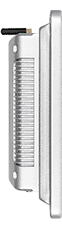
Slim fanless aluminium profileSlim fanless aluminium profile
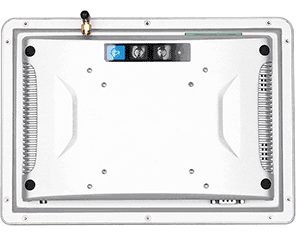
Rear — VESA mount and I/ORear — VESA mount & I/O
Hardware

Industrial by design

Housed in a die-cast aluminium enclosure with an IP65 front and no moving parts, the TouchGW 101 is built for continuous operation — on a wall, a desk stand or a VESA arm.

  • Rockchip RK3568 — quad-core 64-bit Cortex-A55, 2 GB RAM, 32 GB storage
  • 10.1″ capacitive touch — 1280 × 800, 10-point multi-touch, hardened glass
  • Gigabit LAN · analog audio · USB — the connections the firmware uses
  • IP65 front · fanless aluminium — dust- and jet-water-resistant, silent
  • 12–36 V DC · -10 °C to +60 °C · VESA 100 × 75, wall or panel mount
Connections
Bottom edge connections
Bottom edge — DC 12–36 V, 2× USB, microSD / SIM, HDMI, LAN (RJ45), Audio I/O, RS-232 (COM)
Top edge connections
Top edge — screw-terminal block (power · UART · CAN · digital I/O · RS-485), COM ports, LED, power button, Wi-Fi antenna, ground
Specifications

At a glance

ProcessorRockchip RK3568 — quad-core 64-bit Arm Cortex-A55 @ 2.0 GHz, Mali-G52 GPU, 1 TOPS NPU
Memory / Storage2 GB LPDDR4 · 32 GB eMMC (redundant A/B firmware slots)
Display10.1″ TFT LCD · 1280 × 800 (16:10) · 300 cd/m² · 1000:1 · 16.7 M colours · 85° all directions
TouchProjected-capacitive · 10-point multi-touch · hardened glass front
NetworkGigabit Ethernet (10/100/1000) · on-board Wi-Fi + Bluetooth 5.0
AudioAudio I/O — one 3.5 mm jack combining analog output and microphone input
Interfaces2 × USB · HDMI (up to 4K) · RS-232 (COM) · microSD (TF) · SIM (optional 4G/LTE) · USB OTG · screw-terminal block (serial UART, CAN, 3× digital I/O, RS-485)
EnclosureDie-cast aluminium, fanless · front panel IP65 · 261.4 × 185.4 × 51 mm (W×H×D)
MountingDesktop stand · wall · VESA 100 × 75 · panel / cantilever (cut-out 241.3 × 165.4 mm)
Button actionsUp to 16 steps per button, run in order · per-step wait 10 ms – 2 min · each step to up to 16 targets in parallel · UDP / TCP (text or hex) · HTTP GET / POST / PUT with custom headers and body · local audio playback (one per button, optional loop)
SoftwarenoxIT TouchGW firmware on Debian Linux — single static application, kiosk boot
SecurityHTTPS admin · panel PIN · Ed25519-signed firmware · admin password
Power12–36 V DC (barrel jack or terminal block) · ~18 W typical
EnvironmentOperating -10 °C to +60 °C · storage -20 °C to +70 °C · up to 95 % RH non-condensing
ComplianceCE · FCC · EMC · CB · RoHS · CCC
FAQ

Professional touch control, answered

Common questions about using the TouchGW 101 as a touch panel controller for AV and automation.

What is the noxIT TouchGW 101?

It is a professional touch panel controller — a rugged 10.1-inch touch control interface with fully configurable on-screen buttons that send UDP, TCP or HTTP commands to control AV, audio, lighting and automation equipment over the network.

Can it control AV, lighting and automation systems?

Yes. Each button can send UDP, TCP or HTTP commands (text or hex) to projectors, matrix switchers, amplifiers, lighting controllers and other network-controllable AV and automation gear — and it can also play local audio for chimes, announcements or alarms.

Can one button run a whole sequence of commands?

Yes — this is what sets the panel apart. A single press can run up to 16 actions in order. Each step can wait from 10 milliseconds to 2 minutes before it runs, and each step can address up to 16 devices at once, in parallel. Steps mix freely: UDP and TCP payloads in text or hex, HTTP GET, POST or PUT with your own headers and body, and local audio playback. A complete scene — displays on, wait, sources and levels set across several amplifiers, chime played, lighting recalled — sits behind one button.

How does it compare to Crestron, AMX or Extron touch panels?

Unlike proprietary AV control systems such as Crestron, AMX or Extron, the TouchGW 101 is a standalone controller you configure yourself in a web browser — no proprietary programming toolchain, dealer licensing or separate control processor. It drives equipment directly with open UDP, TCP and HTTP commands, making it a cost-effective, self-managed alternative for professional touch control.

Is it a standalone controller or does it need a separate processor?

Standalone. The panel runs the control application itself and talks to your equipment directly over Gigabit Ethernet — there is no separate control processor to buy, program or maintain.

About us

Who is noxIT

An engineering company for professional audio and AV over IP. We work with system integrators, consultants and distributors to design customised solutions that are made to last.

noxIT works alongside system integrators, consultants and distributors. You know the site, the client and the trade; we bring the control and audio-networking engineering behind it — the system design, the firmware and software that make it work, and the support that keeps it working years later.

Almost everything we make starts as a real installation problem. The TouchGW 101 is a good example: rooms needed one reliable, fully configurable touch surface to drive AV, audio and automation — without a proprietary control ecosystem, a dealer licence or a separate processor to program. So we took a proven industrial touch platform, wrote the firmware that turns it into a control panel, and built the signed-update and remote-support infrastructure behind it.

That is the part we care about most. A control system is not finished when it is installed; it has to be updatable, diagnosable and secure for years. Everything we ship is designed with that second decade in mind.
AV control products

Complete products under our own name: robust industrial hardware, selected for continuous duty, running firmware we write and maintain ourselves. The TouchGW 101 touch panel controller is the current flagship — standalone, fully configurable and updatable in the field.

Audio-over-IP & AV integration

Design and engineering of professional audio-over-IP and AV networks — sources, transport, endpoints and the control layer that ties them together into something an operator can actually use.

Custom firmware & software

Embedded firmware, control applications, web interfaces and back-end services — written for the specific devices, protocols and constraints a project actually has, not for a generic platform.

Partnership & long-term support

We work through integrators, consultants and distributors, not around them. You keep the site and the customer; we back you with secure remote support even behind a router, signed firmware updates and lifecycle maintenance for as long as the system runs.

Are you an integrator, consultant or distributor with a project that does not quite fit an off-the-shelf panel? Talk to us early — that is when we can help most. Write to support@noxit.it and you will reach the people who build the product.

Get the firmware and user manual

Registered customers get access to the latest signed firmware, the full user manual and direct product support. Create an account and we'll approve it shortly.

Create an account I already have one